Node Readiness Controller
A Kubernetes controller that provides fine-grained, declarative readiness for nodes. It ensures nodes only accept workloads when all required components (e.g., network agents, GPU drivers, storage drivers, or custom health-checks) are fully ready on the node.
Use it to orchestrate complex bootstrap steps in your node-init workflow, enforce node health, and improve workload reliability.
What is Node Readiness Controller?
The Node Readiness Controller extends Kubernetes’ node readiness model by allowing you to define additional pre-requisites for nodes (as readiness rules) based on node conditions. It automatically manages node taints to prevent scheduling until all specified conditions are satisfied.
Why This Project?
Kubernetes nodes have a simple “Ready” condition. Modern workloads need more critical infrastructure dependencies before they can run.
With this controller you can:
- Define custom readiness for your workloads
- Automatically taint and untaint nodes based on condition status
- Support continuous readiness enforcement to block scheduling for fuse break scenarios
- Integrate with existing problem-detectors like NPD or any custom daemons/node plugins for reporting readiness
Key Features
- Multi-condition Rules: Define rules that require ALL specified conditions to be satisfied
- Flexible Enforcement: Support for bootstrap-only and continuous enforcement modes
- Conflict Prevention: Validation webhook prevents conflicting taint configurations
- Dry Run Mode: Preview rule impact before applying changes
- Comprehensive Status: Detailed observability into rule evaluation and node readiness status
- Node Targeting: Use label selectors to target specific node types
- Bootstrap Completion Tracking: Prevents re-evaluation once bootstrap conditions are met
Demo
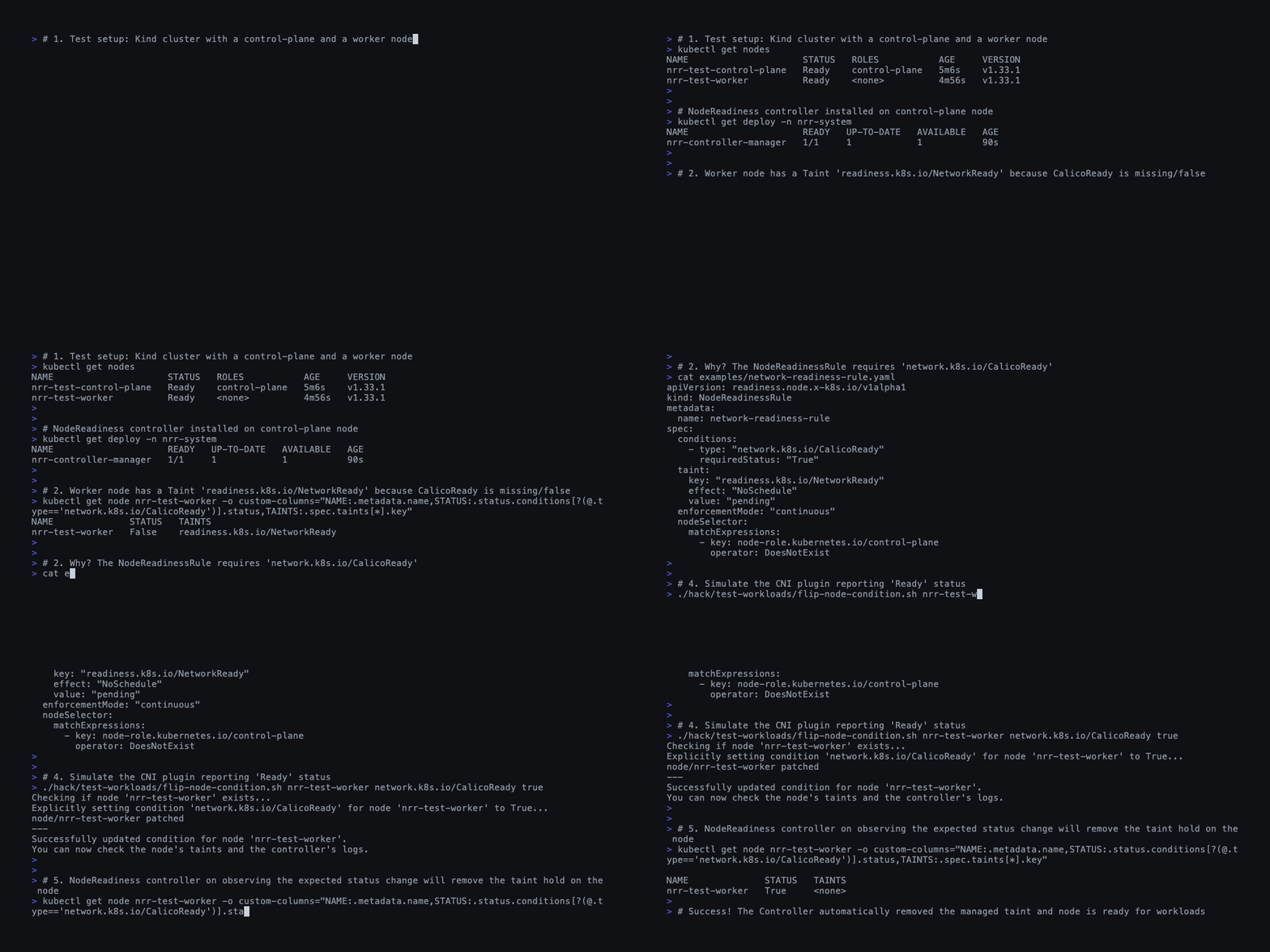
Node Readiness Controller in Kind cluster
Example Rule
apiVersion: readiness.node.x-k8s.io/v1alpha1
kind: NodeReadinessRule
metadata:
  name: network-readiness-rule
spec:
  conditions:
    - type: "example.com/CNIReady"
      requiredStatus: "True"
  taint:
    key: "readiness.k8s.io/NetworkReady"
    effect: "NoSchedule"
    value: "pending"
  enforcementMode: "bootstrap-only"
  nodeSelector:
    matchLabels:
      node-role.kubernetes.io/worker: ""
Getting Involved
If you’re interested in participating in future discussions or development related to Node Readiness Controller, you can reach the maintainers of the project at:
- Slack: #sig-node-readiness-controller (visit slack.k8s.io for a workspace invitation)
Open Issues / PRs / Discussions here:
- Issues: GitHub Issues
- Discussions: GitHub Discussions
See the Kubernetes community on the community page. You can also engage with SIG Node at #sig-node and mailing list.
Project Status
This project is currently in alpha. The API may change in future releases.
Concepts
This section explores the core concepts of the Node Readiness Controller and how to use it to manage node lifecycle.
Node Readiness Rule (NRR)
The NodeReadinessRule is the primary resource used to define readiness criteria for your nodes. It allows you to define declarative “gates” that a node must pass before it is considered ready for workloads.
A rule specifies:
- Target Nodes: Which nodes the rule applies to (using
nodeSelector). - Readiness Conditions: A list of conditions (type and status) that must be met.
- Readiness Taint: The taint to apply to the node if the conditions are not met.
When a rule is created, the controller continuously watches all matching nodes. If a node does not satisfy the required conditions, the controller ensures the configured taint is present, preventing the scheduler from assigning new pods to that node.
Readiness Domain and Taint Keys
Node Readiness Controller uses the readiness.k8s.io domain for taints and annotations that it owns. All spec.taint.key values in NodeReadinessRule must start with the readiness.k8s.io/ prefix; this is enforced by the CRD schema.
Typical taint keys look like:
readiness.k8s.io/cni.example.net/network-not-readyreadiness.k8s.io/csi.vendor.com/storage-driver-not-readyreadiness.k8s.io/<dns.subdomain>/<component-name>
The segment after readiness.k8s.io/ should describe the dependency or subsystem whose readiness is being guarded (for example, a CNI plugin, storage backend, or security agent). Treat this domain as reserved for the controller and closely related components, and avoid reusing it for unrelated taints.
Enforcement Modes
The controller supports two distinct modes of enforcement, configured via spec.enforcementMode, to handle different operational needs.
1. Continuous Enforcement (continuous)
In this mode, the controller actively maintains the readiness guarantee throughout the entire lifecycle of the node.
- Behavior:
- If conditions fail: The taint is applied immediately.
- If conditions pass: The taint is removed.
- Use Case: Critical infrastructure dependencies that must always be healthy.
- Example: A CNI plugin or a storage daemon must be running. If they crash, you want the node effectively taken offline (tainted) immediately to prevent application failures.
2. Bootstrap-Only Enforcement (bootstrap-only)
In this mode, the controller enforces readiness only during the initial node startup (bootstrap).
- Behavior:
- The taint is applied when the node first joins or the rule is created.
- The controller waits for the conditions to be met.
- Once satisfied:
- The taint is removed.
- A completion marker is added to the node’s annotations:
readiness.k8s.io/bootstrap-completed-<ruleName>=true.
- After completion: The controller ignores this rule for the node, even if the conditions fail later.
- Use Case: One-time initialization steps.
- Example: Pre-pulling heavy container images, initializing a local cache, or performing hardware provisioning that only needs to happen once per boot.
Readiness Condition Reporting
The Node Readiness Controller operates on Node Conditions. It does not perform health checks itself; rather, it reacts to the state of conditions on the Node object.
This design decouples the policy (the Controller) from the health checking (the Reporter). You have multiple options for reporting these conditions:
Option 1: Node Problem Detector (NPD)
The Node Problem Detector is a standard Kubernetes add-on commonly found in many clusters. It is designed to monitor node health and update NodeConditions or emit Events.
You can extend NPD with Custom Plugins (Monitor Scripts) to check the status of your specific components (e.g., checking if a daemon process is running or if a local endpoint is responding).
Why choose NPD?
- Existing Infrastructure: Leverages a tool that may already be running and authorized to update node status.
- Separation of Concerns: Decouples the monitoring logic from the workload itself (no need to modify your DaemonSet manifests to add sidecars).
- Centralized Config: Health checks are defined in NPD configuration rather than scattered across workload pod specs.
Option 2: Readiness Condition Reporter
To help you integrate custom checks where NPD might not be suitable, the project includes a lightweight Readiness Condition Reporter. This is designed to be run as a sidecar container within your DaemonSet.
- How it works:
- It can run as a side-car container that runs in the same Pod as your workload.
- It periodically checks a local http endpoint (e.g., healthz probe).
- It patches the Node status with a custom Condition (e.g.,
example.com/MyCustomServiceReady).
When to choose the Reporter?
- Simplicity: Good for simple “is this HTTP endpoint up?” checks without configuring external scripts.
- Direct Coupling: Useful when you want the readiness reporting lifecycle of the component to strictly match the pod’s lifecycle.
Dry Run Mode
To reduce the operational risks while deploying new readiness rules in production, the controller includes a dryRun capability to first analyze the impact before actual deployment.
When spec.dryRun: true is set on a rule:
- The controller evaluates all nodes against the criteria.
- No taints are applied or removed.
- The intended actions are reported in the
status.dryRunResultsfield of theNodeReadinessRule.
This allows you to preview exactly which nodes would be affected and identifying any potential misconfigurations (like a typo in a label selector) before they impact your cluster.
Installation
Follow this guide to install the Node Readiness Controller in your Kubernetes cluster.
Prerequisites
If you plan to use the install-full.yaml option (which includes secure metrics and the validating admission webhook), you must first have cert-manager installed in your cluster.
Deployment Options
Option 1: Official Release (Recommended)
First, to install the CRDs, apply the crds.yaml manifest:
# Replace with the desired version
VERSION=v0.1.1
kubectl apply -f https://github.com/kubernetes-sigs/node-readiness-controller/releases/download/${VERSION}/crds.yaml
kubectl wait --for condition=established --timeout=30s crd/nodereadinessrules.readiness.node.x-k8s.io
2. Install the Controller
Choose one of the two following manifests based on your requirements:
| Manifest | Contents | Prerequisites |
|---|---|---|
install.yaml | Core Controller | None |
install-full.yaml | Core Controller + Metrics (Secure) + Validation Webhook | cert-manager |
Standard Installation (Minimal): The simplest way to deploy the controller with no external dependencies.
kubectl apply -f https://github.com/kubernetes-sigs/node-readiness-controller/releases/download/${VERSION}/install.yaml
Full Installation (Production Ready): Includes secure metrics (TLS-protected) and validating webhooks for rule conflict prevention. Requires cert-manager to be installed in your cluster.
kubectl apply -f https://github.com/kubernetes-sigs/node-readiness-controller/releases/download/${VERSION}/install-full.yaml
This will deploy the controller into the nrr-system namespace on any available node in your cluster.
Controller priority
The controller is deployed with system-cluster-critical priority to prevent eviction during node resource pressure.
If it gets evicted during resource pressure, nodes can’t transition to Ready state, blocking all workload scheduling cluster-wide.
This is the priority class used by other critical cluster components (eg: core-dns).
Images
The official releases use multi-arch images (AMD64, Arm64) and are available at registry.k8s.io/node-readiness-controller/node-readiness-controller
REPO="registry.k8s.io/node-readiness-controller/node-readiness-controller"
TAG=$(skopeo list-tags docker://$REPO | jq .'Tags[-1]' | tr -d '"')
docker pull $REPO:$TAG
Option 2: Advanced Deployment (Kustomize)
If you need deeper customization, you can use Kustomize directly from the source.
# 1. Install CRDs
kubectl apply -k config/crd

# 2. Deploy Controller with default configuration
kubectl apply -k config/default
You can enable optional components (Metrics, TLS, Webhook) by creating a kustomization.yaml that includes the relevant components from the config/ directory. For reference on how these components can be combined, see the deploy-with-metrics, deploy-with-tls, deploy-with-webhook, and deploy-full targets in the projects Makefile.
Verification
After installation, verify that the controller is running successfully.
-
Check Pod Status:
kubectl get pods -n nrr-systemYou should see a pod named
nrr-controller-manager-...inRunningstatus. -
Check Logs:
kubectl logs -n nrr-system -l control-plane=controller-managerLook for “Starting EventSource” or “Starting Controller” messages indicating the manager is active.
-
Verify CRDs:
kubectl get crd nodereadinessrules.readiness.node.x-k8s.io
Uninstallation
IMPORTANT: Follow this order to avoid “stuck” resources.
The controller uses a finalizer (readiness.node.x-k8s.io/cleanup-taints) on NodeReadinessRule resources to ensure taints are safely removed from nodes before a rule is deleted.
You must delete all rule objects before deleting the controller.
-
Delete all Rules:
kubectl delete nodereadinessrules --allWait for this command to complete. This ensures the running controller removes its taints from your nodes.
-
Uninstall Controller:
# If installed via release manifest kubectl delete -f https://github.com/kubernetes-sigs/node-readiness-controller/releases/download/${VERSION}/install.yaml # Or if using the full manifest kubectl delete -f https://github.com/kubernetes-sigs/node-readiness-controller/releases/download/${VERSION}/install-full.yaml # OR if using Kustomize kubectl delete -k config/default -
Uninstall CRDs (Optional):
kubectl delete -k config/crd
Recovering from Stuck Resources
If you accidentally deleted the controller before the rules, the NodeReadinessRule objects will get stuck in a Terminating state because the controller is needed to cleanup the taints and finalizers.
To force-delete them (this will require you to manually clean up the managed taints if any on your nodes):
# Patch the finalizer to remove it
kubectl patch nodereadinessrule <rule-name> -p '{"metadata":{"finalizers":[]}}' --type=merge
Troubleshooting Deployment
RBAC Permissions If the controller logs show “Forbidden” errors, verify the ClusterRole bindings:
kubectl describe clusterrole nrr-manager-role
It requires nodes (update/patch) and nodereadinessrules (all) access.
Debug Logging To enable verbose logging for deeper investigation:
kubectl patch deployment -n nrr-system nrr-controller-manager \
  -p '{"spec":{"template":{"spec":{"containers":[{"name":"manager","args":["--zap-log-level=debug"]}]}}}}'
Getting Started
This guide covers how to use the Node Readiness Controller to define and enforce node readiness checks using NodeReadinessRule resources.
Prerequisites: Node Readiness Controller must be installed. See Installation.
Creating a Readiness Rule
The core resource is the NodeReadinessRule CRD. It defines a set of conditions
that a node must meet to be considered “workload ready”. If the conditions are
not met, the controller applies a specific taint to the node.
Basic Example: Storage Readiness
Here is a rule that ensures a storage plugin is registered before allowing workloads that need it.
apiVersion: readiness.node.x-k8s.io/v1alpha1
kind: NodeReadinessRule
metadata:
  name: storage-readiness-rule
spec:
  # The label selector determines which nodes this rule applies to
  nodeSelector:
    matchLabels:
      storage-backend: "nfs"

  # The conditions that must be True for the node to be considered ready
  conditions:
    - type: "csi.example.com/NodePluginRegistered"
      requiredStatus: "True"
    - type: "csi.example.com/BackendReachable"
      requiredStatus: "True"

  # The taint to apply if conditions are NOT met
  taint:
    key: "readiness.k8s.io/vendor.com/nfs-unhealthy"
    effect: "NoSchedule"

  # When to enforce: 'bootstrap-only' (initial setup) or 'continuous' (ongoing health)
  enforcementMode: "continuous"
Configuring the Rule
1. Select Target Nodes
Use the nodeSelector to target specific nodes (eg., GPU nodes).
Note: These labels could be configured at node registration (e.g., via Kubelet
--node-labels). Relying on labels added asynchronously by addons (like Node Feature Discovery) can create a race condition where the node remains schedulable until the labels appear.
2. Define Readiness Conditions
The conditions list defines the criteria. The controller watches the Node’s status for these conditions.
type: The exact string matching the NodeCondition type.requiredStatus: The status required (True,False, orUnknown).
3. Choose an Enforcement Mode
The enforcementMode determines how the controller manages the taint lifecycle.
bootstrap-only: Use this for one-time initialization tasks (e.g., installing a kernel module or driver). Once the conditions are met once, the taint is removed and never reapplied.continuous: Use this for ongoing health checks (e.g., network connectivity). If the condition fails at any time, the taint is reapplied.
For more details on these modes, see Concepts.
4. Configure the Taint
Define the taint that will block scheduling.
- Key: Must start with
readiness.k8s.io/prefix. - Effect:
NoSchedule: Prevents new pods from scheduling (Recommended).PreferNoSchedule: Tries to avoid scheduling.NoExecute: Evicts running pods if they don’t tolerate the taint.
Note: To eliminate startup race conditions, register nodes with this taint (e.g., via Kubelet
--register-with-taints). The controller will remove it once conditions are met.
Caution: When using
NoExecutewithcontinuousmode: if a condition fails momentarily, all workloads on the node (without tolerations) will be immediately evicted, which can cause service disruption.
The admission webhook warns when using NoExecute taint:
$ kubectl apply -f rule.yaml
Warning: NOTE: NoExecute will evict existing pods without tolerations. Ensure critical system pods have appropriate tolerations
nodereadinessrule.readiness.node.x-k8s.io/my-rule created
Rule Validations
Avoiding Taint Key Conflicts
The admission webhook prevents multiple rules from using the same taint.key and taint.effect on overlapping node selectors.
Example conflict:
# Rule 1
spec:
  conditions:
    - type: "device.gpu-vendor.net/DevicePluginRegistered"
      requiredStatus: "True"
  nodeSelector:
    matchLabels:
      feature.node.kubernetes.io/pci-10de.present: "true"
  taint:
    key: "readiness.k8s.io/vendor.com/gpu-not-ready"
    effect: "NoSchedule"

# Rule 2 - This will be REJECTED
spec:
  conditions:
    - type: "cniplugin.example.net/rdma/NetworkReady"
    requiredStatus: "True"
  nodeSelector:
    matchLabels:
      feature.node.kubernetes.io/pci-10de.present: "true"
  taint:
    key: "readiness.k8s.io/vendor.com/gpu-not-ready"  # Same (taint-key + effect) but different conditions = conflict
    effect: "NoSchedule"
Taint Key Naming
Taint keys must have the readiness.k8s.io/ prefix to clearly identify
readiness-related taints and avoid conflicts with other controllers.
Use unique, descriptive taint keys for different readiness checks. Follow Kubernetes naming conventions.
Valid:
taint:
  key: "readiness.k8s.io/vendor.com/network-not-ready"
  key: "readiness.k8s.io/vendor.com/gpu-not-ready"
Invalid:
taint:
  key: "network-ready"              # Missing prefix
  key: "node.kubernetes.io/ready"   # Wrong prefix
Testing with Dry Run
You can preview the impact of a rule without actually tainting nodes using dryRun.
spec:
  dryRun: true  # Enable dry run mode
  conditions:
    - type: "csi.example.com/NodePluginRegistered"
      requiredStatus: "True"
Check the status of the rule to follow the results:
kubectl get nodereadinessrule my-rule -o yaml
Look for dryRunResults in the output to see which nodes would be tainted.
Reporting Node Conditions
The Node Readiness Controller only ‘reacts’ to observed conditions on the Node object. These conditions can be set by various tools:
- Node Problem Detector (NPD): You can configure NPD with custom plugins to monitor system state and report conditions.
- Custom Health-Checkers or Sidecars: You can run a daemonset or a small sidecar (eg., Readiness Condition Reporter) that checks your application or driver and updates the Node status.
- External Controllers: Any tool that can patch Node status can trigger these rules.
For a full example of setting up a custom condition for a security agent, see the Security Agent Readiness Example.
CNI Readiness
In many Kubernetes clusters, the CNI plugin runs as a DaemonSet. When a new node joins the cluster, there is a race condition:
- The Node object is created and marked
Readyby the Kubelet. - The Scheduler sees the node as
Readyand schedules application pods. - However, the CNI DaemonSet might still be initializing networking on that node.
This guide demonstrates how to use the Node Readiness Controller to prevent pods from being scheduled on a node until the Container Network Interface (CNI) plugin (e.g., Calico) is fully initialized and ready.
The high-level steps are:
- Node is bootstrapped with a startup taint
readiness.k8s.io/NetworkReady=pending:NoScheduleimmediately upon joining. - A reporter DaemonSet is deployed to monitor the CNI’s health and report it to the API server as node-condition (
projectcalico.org/CalicoReady). - Node Readiness Controller will untaint the node only when the CNI reports it is ready.
Step-by-Step Guide
This example uses Calico, but the pattern applies to any CNI.
Note: You can find all the manifests used in this guide in the
examples/cni-readinessdirectory.
1. Deploy the Readiness Condition Reporter
We need to bridge Calico’s internal health status to a Kubernetes Node Condition. We will deploy a reporter DaemonSet that runs on every node.
This reporter checks Calico’s local health endpoint (http://localhost:9099/readiness) and updates a node condition projectcalico.org/CalicoReady.
Using a separate DaemonSet instead of a sidecar ensures that readiness reporting works even if the CNI pod is crashlooping or failing to start containers.
Deploy the Reporter DaemonSet:
# cni-reporter-ds.yaml
apiVersion: apps/v1
kind: DaemonSet
metadata:
  name: cni-reporter
  namespace: kube-system
spec:
  # ...
  template:
    spec:
      hostNetwork: true
      serviceAccountName: cni-reporter
      tolerations:
      - operator: Exists
      containers:
      - name: cni-status-patcher
        image: registry.k8s.io/node-readiness-controller/node-readiness-reporter:v0.1.1
        env:
          - name: CHECK_ENDPOINT
            value: "http://localhost:9099/readiness"
          - name: CONDITION_TYPE
            value: "projectcalico.org/CalicoReady"
2. Grant Permissions (RBAC)
The reporter needs permission to update the Node object’s status.
# calico-rbac-node-status-patch-role.yaml
apiVersion: rbac.authorization.k8s.io/v1
kind: ClusterRole
metadata:
  name: node-status-patch-role
rules:
- apiGroups: [""]
  resources: ["nodes/status"]
  verbs: ["patch", "update"]
---
apiVersion: rbac.authorization.k8s.io/v1
kind: ClusterRoleBinding
metadata:
  name: calico-node-status-patch-binding
roleRef:
  apiGroup: rbac.authorization.k8s.io
  kind: ClusterRole
  name: node-status-patch-role
subjects:
# Bind to CNI Reporter's ServiceAccount
- kind: ServiceAccount
  name: cni-reporter
  namespace: kube-system
3. Create the Node Readiness Rule
Now define the rule that enforces the requirement. This tells the controller: “Keep the readiness.k8s.io/NetworkReady taint on the node until projectcalico.org/CalicoReady is True.”
# network-readiness-rule.yaml
apiVersion: readiness.node.x-k8s.io/v1alpha1
kind: NodeReadinessRule
metadata:
  name: network-readiness-rule
spec:
  # The condition(s) to monitor
  conditions:
    - type: "projectcalico.org/CalicoReady"
      requiredStatus: "True"

  # The taint to manage
  taint:
    key: "readiness.k8s.io/NetworkReady"
    effect: "NoSchedule"
    value: "pending"

  # "bootstrap-only" means: once the CNI is ready once, we stop enforcing.
  enforcementMode: "bootstrap-only"

  # Update to target only the nodes that need to be protected by this guardrail
  nodeSelector:
    matchLabels:
      node-role.kubernetes.io/worker: ""
Test scripts
-
Create the Readiness Rule:
cd examples/cni-readiness kubectl apply -f network-readiness-rule.yaml -
Install Calico CNI and Apply the RBAC:
chmod +x apply-calico.sh
sh apply-calico.sh
Verification
To test this, add a new node to the cluster.
-
Check the Node Taints: Immediately upon joining, the node should have the taint:
readiness.k8s.io/NetworkReady=pending:NoSchedule. -
Check Node Conditions: Watch the node conditions. You will initially see
projectcalico.org/CalicoReadyasFalseor missing. Once Calico starts, the reporter will update it toTrue. -
Check Taint Removal: As soon as the condition becomes
True, the Node Readiness Controller will remove the taint, and workloads will be scheduled.
Security Agent Readiness Guardrail
This guide demonstrates how to use the Node Readiness Controller to prevent workloads from being scheduled on a node until a security agent (for example, Falco) is fully initialized and actively monitoring the node.
The Problem
In many Kubernetes clusters, security agents are deployed as DaemonSets. When a new node joins the cluster, there is a race condition:
- A new node joins the cluster and is marked
Readyby the kubelet. - The scheduler sees the node as
Readyand considers the node eligible for workloads. - However, the security agent on that node may still be starting or initializing.
Result: Application workloads may start running before node is security compliant, creating a blind spot where runtime threats, policy violations, or anomalous behavior may go undetected.
The Solution
We can use the Node Readiness Controller to enforce a security readiness guardrail:
- Taint the node with a startup taint
readiness.k8s.io/falco.org/security-agent-ready=pending:NoScheduleas soon as it joins the cluster. - Monitor the security agent’s readiness using a sidecar and expose it as a Node Condition.
- Untaint the node only after the security agent reports that it is ready.
Step-by-Step Guide (Falco Example)
This example uses Falco as a representative security agent, but the same pattern applies to any node-level security or monitoring agent.
Note: All manifests referenced in this guide are available in the
examples/security-agent-readinessdirectory.
1. Deploy the Readiness Condition Reporter
To bridge the security agent’s internal health signal to Kubernetes, we deploy a readiness reporter that updates a Node Condition. In this example, the reporter is deployed as a sidecar container in the Falco DaemonSet. Components that natively update Node conditions would not require this additional container.
This sidecar periodically checks Falco’s local health endpoint (http://localhost:8765/healthz) and updates a Node Condition falco.org/FalcoReady.
Patch your Falco DaemonSet:
# security-agent-reporter-sidecar.yaml
- name: security-status-patcher
  image: registry.k8s.io/node-readiness-controller/node-readiness-reporter:v0.1.1
  imagePullPolicy: IfNotPresent
  env:
    - name: NODE_NAME
      valueFrom:
        fieldRef:
          fieldPath: spec.nodeName
    - name: CHECK_ENDPOINT
      value: "http://localhost:8765/healthz" # Update the right security agent endpoint
    - name: CONDITION_TYPE
      value: "falco.org/FalcoReady"   # Update the right condition
    - name: CHECK_INTERVAL
      value: "5s"
  resources:
    limits:
      cpu: "10m"
      memory: "32Mi"
    requests:
      cpu: "10m"
      memory: "32Mi"
Note: In this example, the security agent’s health is monitored by a side-car, so the reporter’s lifecycle is the same as the pod lifecycle. If the Falco pod is crashlooping, the sidecar will not run and cannot report readiness. For robust
continuousreadiness reporting, the reporter should be deployed independently of the security agent pod. For example, a separate DaemonSet (similar to Node Problem Detector) can monitor the agent and update Node conditions even if the agent pod crashes.
2. Grant Permissions (RBAC)
The readiness reporter sidecar needs permission to update the Node object’s status to publish readiness information.
# security-agent-node-status-rbac.yaml
apiVersion: rbac.authorization.k8s.io/v1
kind: ClusterRole
metadata:
  name: node-status-patch-role
rules:
- apiGroups: [""]
  resources: ["nodes"]
  verbs: ["get"]
- apiGroups: [""]
  resources: ["nodes/status"]
  verbs: ["patch", "update"]
---
apiVersion: rbac.authorization.k8s.io/v1
kind: ClusterRoleBinding
metadata:
  name: security-agent-node-status-patch-binding
roleRef:
  apiGroup: rbac.authorization.k8s.io
  kind: ClusterRole
  name: node-status-patch-role
subjects:
# Bind to security agent's ServiceAccount
- kind: ServiceAccount
  name: falco
  namespace: kube-system
3. Create the Node Readiness Rule
Next, define a NodeReadinessRule that enforces the security readiness requirement. This rule instructs the controller: “Keep the readiness.k8s.io/falco.org/security-agent-ready taint on the node until the falco.org/FalcoReady condition becomes True.”
# security-agent-readiness-rule.yaml
apiVersion: readiness.node.x-k8s.io/v1alpha1
kind: NodeReadinessRule
metadata:
  name: security-agent-readiness-rule
spec:
  # Conditions that must be satisfied before the taint is removed
  conditions:
    - type: "falco.org/FalcoReady"
      requiredStatus: "True"

  # Taint managed by this rule
  taint:
    key: "readiness.k8s.io/falco.org/security-agent-ready"
    effect: "NoSchedule"
    value: "pending"

  # "bootstrap-only" means: once the security agent is ready, we stop enforcing.
  # Use "continuous" mode if you want to taint the node if security agent crashes later.
  enforcementMode: "bootstrap-only"

  # Update to target only the nodes that need to be protected by this guardrail
  nodeSelector:
    matchLabels:
      node-role.kubernetes.io/worker: ""
How to Apply
- Create the Node Readiness Rule:
   cd examples/security-agent-readiness
   kubectl apply -f security-agent-readiness-rule.yaml
- Install Falco and Apply the RBAC:
chmod +x apply-falco.sh
sh apply-falco.sh
Verification
To verify that the guardrail is working, add a new node to the cluster.
-
Check the Node Taints: Immediately after the node joins, it should have the taint:
readiness.k8s.io/falco.org/security-agent-ready=pending:NoSchedule. -
Check Node Conditions: Observe the node’s conditions. You will initially see
falco.org/FalcoReadyasFalseor missing. Once Falco initializes, the sidecar reporter updates the condition toTrue. -
Check Taint Removal: As soon as the condition becomes
True, the Node Readiness Controller removes the taint, allowing workloads to be scheduled on the node.
Releases
This page details the official releases of the Node Readiness Controller.
v0.2.0
Date: 2026-02-28
This release brings several new features, including a validating admission webhook that validates NodeReadinessRule configurations, prevents conflicting rules with overlapping node selectors, and warns against risky NoExecute enforcement. It also introduces metrics manifests natively integrated with Kustomize, which includes support for secure metrics via TLS. Finally, this release includes major documentation improvements.
Release Notes
Features & Enhancements
- Add webhook as kustomize component (#122)
- Enable metrics manifests (#79)
- Use
status.patchapi for node updates (#104) - Mark controller as
system-cluster-criticalto prevent eviction (#108) - Enhance Dockerfiles and bump Go module version (#113)
- Add
build-installermake target to create CRD and install manifests (#95, #93) - Add a pull request template (#110)
- Restrict NodeReadinessRuleSpec.Taint to “readiness.k8s.io/” prefix (#112)
Bug Fixes
- Fix dev-container: disable moby in newer version of debian (#127)
- Add missing boilerplate headers in
metrics.go(#119) - Update path to logo in README (#115)
Code Cleanup & Maintenance
- Remove unused
globalDryRunfeature (#123, #130) - Bump versions for devcontainer and golangci-kal (#132)
- Add release automation workflow (#144)
Documentation & Examples
- Document
NoExecutetaint risks and add admission warning (#120) - Updates on getting-started guide and installation docs (#135, #92)
- Add example for security agent readiness (#101)
- Managing CNI-readiness with node-readiness-controller and switch reporter to daemonset (#99, #116)
- Update cni-patcher to use
registry.k8s.ioimage (#96) - Add video demo (#114) and update heptagon logo (#109)
- Remove stale
docs/spec.md(#126)
Images
The following container images are published as part of this release.
// Node readiness controller
registry.k8s.io/node-readiness-controller/node-readiness-controller:v0.2.0

// Report component readiness condition from the node
registry.k8s.io/node-readiness-controller/node-readiness-reporter:v0.2.0
Installation
Prerequisites: If you plan to install with all optional features enabled (install-full.yaml), you must have cert-manager installed in your cluster.
To install the CRDs, apply the crds.yaml manifest for this version:
kubectl apply -f https://github.com/kubernetes-sigs/node-readiness-controller/releases/download/v0.2.0/crds.yaml
To install the controller, choose one of the following manifests based on your requirements:
| Manifest | Contents | Prerequisites |
|---|---|---|
install.yaml | Core Controller | None |
install-full.yaml | Core Controller + Metrics (Secure) + Validation Webhook | cert-manager |
Standard Installation (Minimal): The simplest way to deploy the controller with no external dependencies.
kubectl apply -f https://github.com/kubernetes-sigs/node-readiness-controller/releases/download/v0.2.0/install.yaml
Full Installation (Production Ready): Includes secure metrics (TLS-protected) and validating webhooks for rule conflict prevention. Requires cert-manager to be installed in your cluster.
kubectl apply -f https://github.com/kubernetes-sigs/node-readiness-controller/releases/download/v0.2.0/install-full.yaml
This will deploy the controller into any available node in the nrr-system namespace in your cluster. Check here for more detailed installation instructions.
Contributors
- ajaysundark
- arnab-logs
- AvineshTripathi
- GGh41th
- Hii-Himanshu
- ketanjani21
- knechtionscoding
- OneUpWallStreet
- pehlicd
- Priyankasaggu11929
- sats-23
v0.1.1
Date: 2026-01-19
This patch release includes important regression bug fixes and documentation updates made since v0.1.0.
Release Notes
Bug or Regression
- Fix race condition where deleting a rule could leave taints stuck on nodes (#84)
- Ensure new node evaluation results are persisted to rule status (#87]
Documentation
- Add/update Concepts documentation (enforcement modes, dry-run, condition reporting) (#74)
- Add v0.1.0 release notes to docs (#76)
Images
The following container images are published as part of this release.
// Node readiness controller
registry.k8s.io/node-readiness-controller/node-readiness-controller:v0.1.1

// Report component readiness condition from the node
registry.k8s.io/node-readiness-controller/node-readiness-reporter:v0.1.1
Installation
To install the CRDs, apply the crds.yaml manifest for this version:
kubectl apply -f https://github.com/kubernetes-sigs/node-readiness-controller/releases/download/v0.1.1/crds.yaml
To install the controller, apply the install.yaml manifest for this version:
kubectl apply -f https://github.com/kubernetes-sigs/node-readiness-controller/releases/download/v0.1.1/install.yaml
This will deploy the controller into any available node in the nrr-system namespace in your cluster. Check here for more installation instructions.
Contributors
- ajaysundark
v0.1.0
Date: 2026-01-14
This is the first official release of the Node Readiness Controller.
Release Notes
- Initial implementation of the Node Readiness Controller.
- Support for
NodeReadinessRuleAPI (readiness.node.x-k8s.io/v1alpha1). - Defines custom readiness rules for k8s nodes based on node conditions.
- Manages node taints to prevent scheduling until readiness rules are met.
- Includes modes for bootstrap-only and continuous readiness enforcement.
- Readiness condition reporter for reporting component health.
Images
The following container images are published as part of this release.
// Node readiness controller
registry.k8s.io/node-readiness-controller/node-readiness-controller:v0.1.0

// Report component readiness condition from the node
registry.k8s.io/node-readiness-controller/node-readiness-reporter:v0.1.0
Installation
To install the CRDs, apply the crds.yaml manifest for this version:
kubectl apply -f https://github.com/kubernetes-sigs/node-readiness-controller/releases/download/v0.1.0/crds.yaml
To install the controller, apply the install.yaml manifest for this version:
kubectl apply -f https://github.com/kubernetes-sigs/node-readiness-controller/releases/download/v0.1.0/install.yaml
This will deploy the controller into any available node in the nrr-system namespace in your cluster. Check here for more installation instructions.
Contributors
- ajaysundark
- Karthik-K-N
- Priyankasaggu11929
- sreeram-venkitesh
- Hii-Himanshu
- Serafeim-Katsaros
- arnab-logs
- Yuan-prog
- AvineshTripathi
API Reference
Packages
readiness.node.x-k8s.io/v1alpha1
Package v1alpha1 contains API Schema definitions for the v1alpha1 API group.
Resource Types
ConditionEvaluationResult
ConditionEvaluationResult provides a detailed report of the comparison between the Node’s observed condition and the rule’s requirement.
Appears in:
| Field | Description | Default | Validation |
|---|---|---|---|
type string | type corresponds to the Node condition type being evaluated. | MaxLength: 316 MinLength: 1 | |
currentStatus ConditionStatus | currentStatus is the actual status value observed on the Node, one of True, False, Unknown. | Enum: [True False Unknown] | |
requiredStatus ConditionStatus | requiredStatus is the status value defined in the rule that must be matched, one of True, False, Unknown. | Enum: [True False Unknown] |
ConditionRequirement
ConditionRequirement defines a specific Node condition and the status value required to trigger the controller’s action.
Appears in:
| Field | Description | Default | Validation |
|---|---|---|---|
type string | type of Node condition Following kubebuilder validation is referred from https://pkg.go.dev/k8s.io/apimachinery/pkg/apis/meta/v1#Condition | MaxLength: 316 MinLength: 1 | |
requiredStatus ConditionStatus | requiredStatus is status of the condition, one of True, False, Unknown. | Enum: [True False Unknown] |
DryRunResults
DryRunResults provides a summary of the actions the controller would perform if DryRun mode is enabled.
Validation:
- MinProperties: 1
Appears in:
| Field | Description | Default | Validation |
|---|---|---|---|
affectedNodes integer | affectedNodes is the total count of Nodes that match the rule’s criteria. | Minimum: 0 | |
taintsToAdd integer | taintsToAdd is the number of Nodes that currently lack the specified taint and would have it applied. | Minimum: 0 | |
taintsToRemove integer | taintsToRemove is the number of Nodes that currently possess the taint but no longer meet the criteria, leading to its removal. | Minimum: 0 | |
riskyOperations integer | riskyOperations represents the count of Nodes where required conditions are missing entirely, potentially indicating an ambiguous node state. | Minimum: 0 | |
summary string | summary provides a human-readable overview of the dry run evaluation, highlighting key findings or warnings. | MaxLength: 4096 MinLength: 1 |
EnforcementMode
Underlying type: string
EnforcementMode specifies how the controller maintains the desired state.
Validation:
- Enum: [bootstrap-only continuous]
Appears in:
| Field | Description |
|---|---|
bootstrap-only | EnforcementModeBootstrapOnly applies configuration only during the first reconcile. |
continuous | EnforcementModeContinuous continuously monitors and enforces the configuration. |
NodeEvaluation
NodeEvaluation provides a detailed audit of a single Node’s compliance with the rule.
Appears in:
| Field | Description | Default | Validation |
|---|---|---|---|
nodeName string | nodeName is the name of the evaluated Node. | MaxLength: 253 MinLength: 1 Pattern: ^[a-z0-9]([-a-z0-9]*[a-z0-9])?(\.[a-z0-9]([-a-z0-9]*[a-z0-9])?)*$ | |
conditionResults ConditionEvaluationResult array | conditionResults provides a detailed breakdown of each condition evaluation for this Node. This allows for granular auditing of which specific criteria passed or failed during the rule assessment. | MaxItems: 5000 | |
taintStatus TaintStatus | taintStatus represents the taint status on the Node, one of Present, Absent. | Enum: [Present Absent] | |
lastEvaluationTime Time | lastEvaluationTime is the timestamp when the controller last assessed this Node. |
NodeFailure
NodeFailure provides diagnostic details for Nodes that could not be successfully evaluated by the rule.
Appears in:
| Field | Description | Default | Validation |
|---|---|---|---|
nodeName string | nodeName is the name of the failed Node. Following kubebuilder validation is referred from https://github.com/kubernetes/apimachinery/blob/84d740c9e27f3ccc94c8bc4d13f1b17f60f7080b/pkg/util/validation/validation.go#L198 | MaxLength: 253 MinLength: 1 Pattern: ^[a-z0-9]([-a-z0-9]*[a-z0-9])?(\.[a-z0-9]([-a-z0-9]*[a-z0-9])?)*$ | |
reason string | reason provides a brief explanation of the evaluation result. | MaxLength: 256 MinLength: 1 | |
message string | message is a human-readable message indicating details about the evaluation. | MaxLength: 10240 MinLength: 1 | |
lastEvaluationTime Time | lastEvaluationTime is the timestamp of the last rule check failed for this Node. |
NodeReadinessRule
NodeReadinessRule is the Schema for the NodeReadinessRules API.
| Field | Description | Default | Validation |
|---|---|---|---|
apiVersion string | readiness.node.x-k8s.io/v1alpha1 | ||
kind string | NodeReadinessRule | ||
metadata ObjectMeta | Refer to Kubernetes API documentation for fields of metadata. | ||
spec NodeReadinessRuleSpec | spec defines the desired state of NodeReadinessRule | ||
status NodeReadinessRuleStatus | status defines the observed state of NodeReadinessRule | MinProperties: 1 |
NodeReadinessRuleSpec
NodeReadinessRuleSpec defines the desired state of NodeReadinessRule.
Appears in:
| Field | Description | Default | Validation |
|---|---|---|---|
conditions ConditionRequirement array | conditions contains a list of the Node conditions that defines the specific criteria that must be met for taints to be managed on the target Node. The presence or status of these conditions directly triggers the application or removal of Node taints. | MaxItems: 32 MinItems: 1 | |
enforcementMode EnforcementMode | enforcementMode specifies how the controller maintains the desired state. enforcementMode is one of bootstrap-only, continuous. “bootstrap-only” applies the configuration once during initial setup. “continuous” ensures the state is monitored and corrected throughout the resource lifecycle. | Enum: [bootstrap-only continuous] | |
taint Taint | taint defines the specific Taint (Key, Value, and Effect) to be managed on Nodes that meet the defined condition criteria. | ||
nodeSelector LabelSelector | nodeSelector limits the scope of this rule to a specific subset of Nodes. | ||
dryRun boolean | dryRun when set to true, The controller will evaluate Node conditions and log intended taint modifications without persisting changes to the cluster. Proposed actions are reflected in the resource status. |
NodeReadinessRuleStatus
NodeReadinessRuleStatus defines the observed state of NodeReadinessRule.
Validation:
- MinProperties: 1
Appears in:
| Field | Description | Default | Validation |
|---|---|---|---|
observedGeneration integer | observedGeneration reflects the generation of the most recently observed NodeReadinessRule by the controller. | Minimum: 1 | |
appliedNodes string array | appliedNodes lists the names of Nodes where the taint has been successfully managed. This provides a quick reference to the scope of impact for this rule. | MaxItems: 5000 items:MaxLength: 253 | |
failedNodes NodeFailure array | failedNodes lists the Nodes where the rule evaluation encountered an error. This is used for troubleshooting configuration issues, such as invalid selectors during node lookup. | MaxItems: 5000 | |
nodeEvaluations NodeEvaluation array | nodeEvaluations provides detailed insight into the rule’s assessment for individual Nodes. This is primarily used for auditing and debugging why specific Nodes were or were not targeted by the rule. | MaxItems: 5000 | |
dryRunResults DryRunResults | dryRunResults captures the outcome of the rule evaluation when DryRun is enabled. This field provides visibility into the actions the controller would have taken, allowing users to preview taint changes before they are committed. | MinProperties: 1 |
TaintStatus
Underlying type: string
TaintStatus specifies status of the Taint on Node.
Validation:
- Enum: [Present Absent]
Appears in:
| Field | Description |
|---|---|
Present | TaintStatusPresent represent the taint present on the Node. |
Absent | TaintStatusAbsent represent the taint absent on the Node. |